Ethernet Surge Protector: 5 Critical Installation Rules
Quick Answer: Why Do Surge Protectors Have Ethernet Ports?
An ethernet cable and a surge protector serve completely different purposes — a surge protector does not replace your ethernet cable; it sits inline on the cable to protect it.
Ethernet ports on surge protectors allow the device to intercept and divert voltage spikes on network cables — not just power lines. Lightning and electrical surges travel through ethernet cables just as easily as power cords, destroying switches, routers, IP cameras, and PoE devices. A surge protector with ethernet ports sits inline on the cable and diverts surge current to ground before it reaches your equipment.
- PoE models: Handle 48–57V DC for powered devices (cameras, APs, phones)
- Both-end rule: Install at both cable ends for 99% effectiveness
- Grounding required: Ungrounded protectors are 80–90% ineffective
Key Facts:
- Protection range: 5kA to 20kA discharge current capacity
- Response time: <1 nanosecond (two-stage GDT+TVS design)
- Clamping voltage: 50–100V (safe for 3.3V/5V ethernet chips)
- Installation: Required at both cable ends for 99% effectiveness vs 60% single-end
- Standards: IEC 61643-21, UL 497B, IEEE 802.3
- Cost: $15–150 per port depending on specifications
Critical statistic: 70–90% of "surge protector didn't work" failures trace to improper grounding, not product defects. A Reddit user had protectors installed on all cameras but never connected the ground wires — three cameras died in one storm.
1. What Is an Ethernet Surge Protector?
1.1 Ethernet Surge Protector Definition
An ethernet surge protector (also called network surge protector, RJ45 surge protector, or ethernet lightning arrester) is a protective device installed inline between your network cable and equipment, featuring two RJ45 ports and a ground wire terminal. The Line port connects to the incoming cable from outside or exposed environments; the Equipment port connects to your device. The device sits in the cable path, typically mounted where cables enter buildings, at equipment racks, or directly at outdoor devices like IP cameras.
1.2 How Ethernet Surge Protectors Work
Inside every quality ethernet surge protector are two components working together in a two-stage GDT+TVS design — the TVS diode catches the fast-rising surge edge in under 1 nanosecond, while the Gas Discharge Tube handles the bulk energy flow.
Gas Discharge Tube (GDT): A ceramic cylinder filled with inert gas. When voltage exceeds 90–230V, the gas ionizes and becomes conductive, creating a path to ground for massive current (up to 20,000 amps). Response time: 100–300 nanoseconds.
TVS Diodes (Transient Voltage Suppressors): Semiconductor junctions that react in under 1 nanosecond, instantly clamping voltage spikes. They can't handle as much energy as GDTs (typically 600–1500W), but their speed catches the fast-rising surge edge.
Normal network signals (1–5V) pass through untouched. When a 1,000V surge hits, the TVS diodes clamp it to 75V in under 1 nanosecond, then the GDT conducts to shunt remaining current to ground.
1.3 What Ethernet Surge Protection Defends Against
Lightning-induced surges: A direct strike to your building's lightning rod or nearby ground can induce 5,000–10,000V on network cables within 100 metres.
Power line cross-connection: When utility power lines contact or fall on telecom cables, 600–1,000V appears on your ethernet. A home network — router, all switches, multiple PCs, NAS, server, two TVs — can be destroyed in a single event.
Electrostatic discharge (ESD): Long outdoor cable runs accumulate static charge, especially in dry climates. Repeated small surges (300–500V) degrade ethernet port components over months until they fail — without any single catastrophic event.

2. Types of Ethernet Surge Protectors
2.1 PoE Ethernet Surge Protectors vs Non-PoE Models
PoE ethernet surge protectors are built to handle both data signals and DC power (48–57V continuous) without component degradation — standard surge components fail under constant DC voltage, making PoE-rated models mandatory for IP cameras, wireless APs, VoIP phones, and PoE-powered switches.
Non-PoE ethernet surge protectors protect only the data pairs and are sufficient for equipment with separate power supplies: desktop network switches, routers and modems, computers with ethernet ports, and media converters.
Can you use a PoE protector on non-PoE equipment? Yes — PoE models protect all eight conductors just like non-PoE versions. The only difference is cost (50–100% premium) and DC voltage handling you won't use.
What happens using wrong type: Installing a non-PoE protector on a PoE camera leaves the power conductors (pairs 4-5, 7-8) completely unprotected. A surge through those pairs bypasses the protector and destroys the camera's PoE module.
| Feature | PoE Surge Protector | Non-PoE Surge Protector |
|---|---|---|
| Protects Data Lines | ✓ All 8 conductors | ✓ All 8 conductors |
| Protects Power | ✓ 48–57V DC (up to 95W PoE++) | ✗ Data only |
| Voltage Rating | 0–60V continuous | 0–5V signaling |
| Price Range | $40–120 per port | $15–60 per port |
| Use For | IP cameras, wireless APs, VoIP phones | Switches, routers, PCs |
| Standards | IEEE 802.3af/at/bt compatible | Standard ethernet only |
| Max Data Rate | 10/100/1000/10000 Mbps | 10/100/1000/10000 Mbps |
2.2 Indoor vs Outdoor Ethernet Surge Protectors
Indoor models use standard plastic housings rated 0–50°C for climate-controlled spaces. Outdoor models require IP65/IP67 rated enclosures per IEC 60529, operating range −40°C to +85°C, conformal coated boards, and UV-resistant housings.
Installing indoor-rated protectors on rooftop IP cameras allows moisture ingress over months. When a storm hits, those protectors may have already failed internally — the cameras connected to them burn out while cameras with proper outdoor protectors survive.
2.3 Ethernet Surge Protector Capacity Ratings
Rated by maximum discharge current (Imax) using the standard 8/20µs waveform per IEC 61643-21 — select 5kA for indoor, 10kA for outdoor, and 20kA for high-risk locations.
- 5kA: Indoor installations, short cable runs (<30m), low-risk areas, office networks
- 10kA: Standard outdoor applications, most IP camera systems, commercial security
- 20kA: High-risk locations (cell towers, hilltops), long aerial runs (>100m), telecom infrastructure
| Installation Type | Min. Capacity | IP Rating | Temp Range | Typical Cost/Port |
|---|---|---|---|---|
| Indoor office network | 5kA | IP20 | 0–50°C | $15–30 |
| Outdoor IP cameras | 10kA | IP65 | −40–85°C | $50–80 |
| Building-to-building link | 20kA | IP65 | −40–85°C | $80–120 |
| Cell tower/industrial | 20kA | IP67 | −40–85°C | $100–150 |
| Coastal/corrosive | 10–20kA | IP67 | −40–85°C | $90–140 |
3. Understanding Ethernet Surge Protector Components
3.1 Gas Discharge Tube (GDT)
A GDT is a small ceramic cylinder (typically 8–10mm) filled with inert gas at low pressure — normal voltage won't ionize the gas, but when voltage exceeds the breakdown threshold (90–230V), the gas ionizes instantly and becomes highly conductive, allowing up to 20kA to flow to ground.
Limitation: GDT response time is 100–300 nanoseconds. In that window, voltage can spike to 200–300V before the GDT fully conducts — enough to damage modern ethernet chips rated for 5V maximum. This is why a second-stage TVS diode is essential.
3.2 TVS Diodes
Transient Voltage Suppression (TVS) diodes clamp voltage in under 1 nanosecond — when voltage exceeds their breakdown rating (typically 60–90V), they instantly conduct and hold voltage to 50–75V.
Limitation: Energy capacity of only 600–1500W. TVS diodes can't handle the sustained high current of a major surge — they'd burn out in milliseconds without the GDT taking over.
3.3 Why Two-Stage Protection Matters
Single-stage (GDT-only) protectors allow 100–200V through during the 200ns reaction delay — often enough to damage gigabit ethernet PHY chips. Two-stage (GDT+TVS) protectors limit voltage to 50–75V even during the initial spike. This is the minimum standard for professional installations per IEC 61643-21.
4. How to Select the Right Ethernet Surge Protector
4.1 For Outdoor IP Camera Systems
Outdoor IP camera systems require PoE-compatible (802.3af/at/bt rated) devices with 10kA minimum discharge current, IP65+ outdoor rating, −40–85°C operating range, and two protectors per camera — one at the camera mounting location and one where the cable enters the building or NVR.
Real case: A surveillance installer protected only the NVR end of sixteen cameras to save money. One lightning storm destroyed all sixteen cameras from surges entering the camera-side cables. Replacement cost: $7,200 equipment + labour. Thirty-two protectors at $960 total would have saved every camera.
4.2 For Network Switches and Routers
Even if your switch is indoors, if any connected cable goes outdoors (to cameras, APs, building links), that cable is an antenna for lightning-induced surges — a Non-PoE 5kA device is adequate for short indoor runs, but 10kA is required if cables exit the building or run near power lines.
4.3 For Building-to-Building Ethernet Links
Any cable running between structures requires 20kA minimum discharge rating and protectors at both buildings — ground potential differences between buildings create large voltage disparities even without direct lightning involvement.
4.4 Quick Selection Guide
| Your Situation | PoE Needed? | Min. Capacity | Indoor/Outdoor | Quantity | Budget/Port |
|---|---|---|---|---|---|
| Outdoor security cameras (PoE) | Yes | 10kA | Outdoor IP65 | 2 per camera | $50–80 |
| Office switch (indoor) | No | 5kA | Indoor IP20 | 1 per exposed cable | $15–30 |
| Wireless AP (outdoor, PoE) | Yes | 10kA | Outdoor IP65 | 2 per AP | $50–80 |
| Home router (ISP connection) | No | 5–10kA | Indoor IP20 | 1 | $20–40 |
| Inter-building fiber converter | No | 20kA | Outdoor IP65 | 2 (one each building) | $80–120 |
| Industrial control network | Maybe | 10–20kA | Industrial IP40–65 | 1–2 per device | $40–100 |
5. Ethernet Surge Protector Installation Guide
5.1 The Both-Ends Protection Rule
Install one surge protector where the cable enters the building or equipment cabinet, and another where it connects to the end device — both-end protection achieves 99% effectiveness versus only 60% for single-end installation.
Surges can be induced anywhere along the cable from magnetic fields around nearby lightning strikes. If you protect only one end, the surge enters from the unprotected side. Both-end protection provides a 40× improvement in reliability for only 2× the cost.

5.2 Proper Grounding for Ethernet Surge Protection
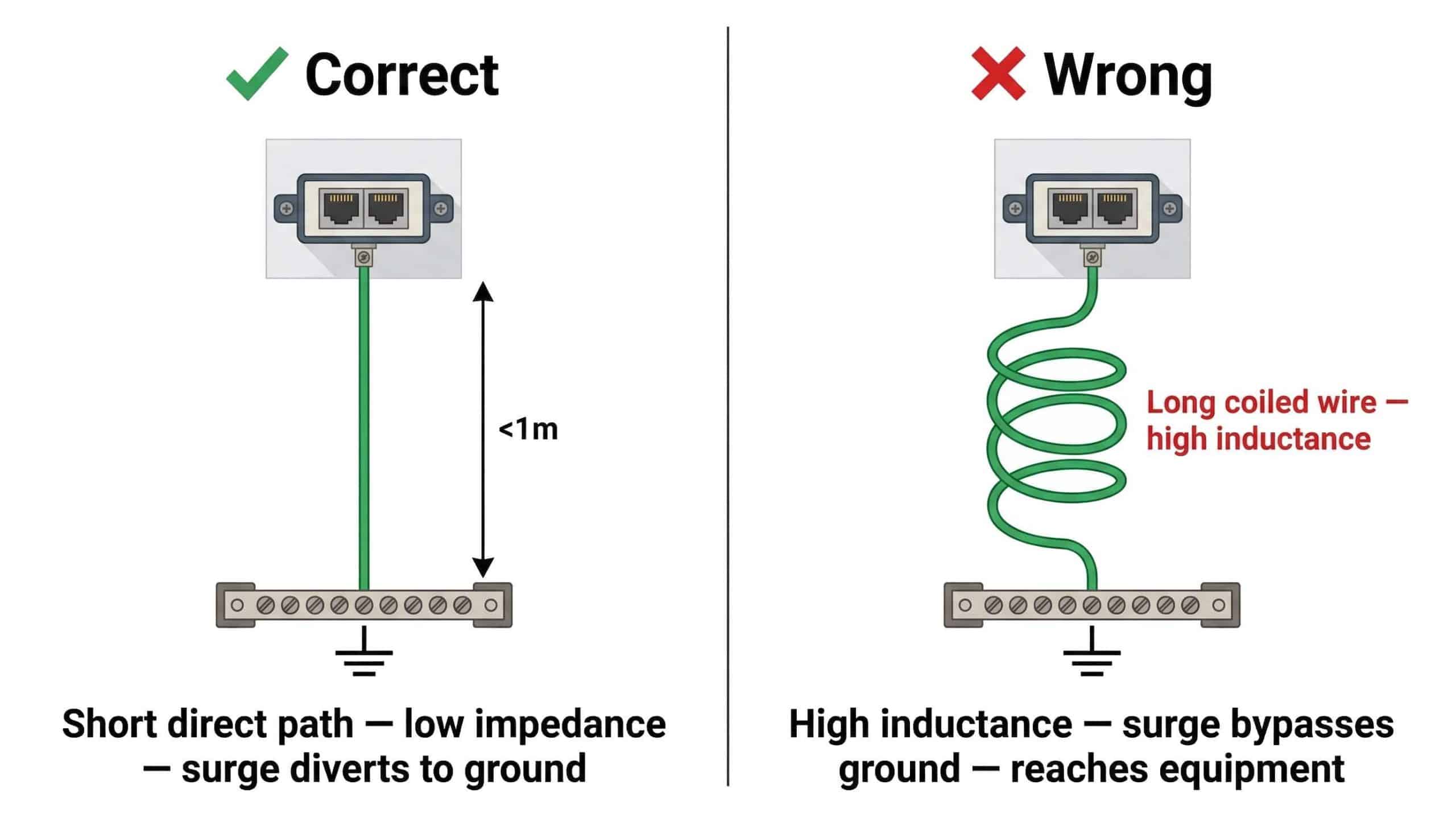
Every surge protector needs a ground wire connecting its ground terminal to earth ground — the most common installation failure (70–90% of all "didn't work" complaints) is inadequate or missing grounding.
Critical grounding specifications per NEC Article 250:
- Wire gauge: Minimum 14 AWG (2.5mm²), preferably 12 AWG (4mm²) or thicker
- Length: Under 1 metre ideal, 3 metres absolute maximum
- Path: Straight and direct — no coils, no sharp 90° bends
- Connection: Star-point grounding (all protectors converge at single ground point)
- Resistance: <10Ω ground resistance verified with earth ground tester
| Ground Wire Length | Inductance | Voltage Drop During Surge | Effective Clamping Voltage | Protection Quality |
|---|---|---|---|---|
| 0.5m (ideal) | 0.5 µH | +50V | 75V + 50V = 125V | ✓ Excellent |
| 1.0m (good) | 1.0 µH | +100V | 75V + 100V = 175V | ✓ Good |
| 3.0m (maximum) | 3.0 µH | +300V | 75V + 300V = 375V | ~ Marginal |
| 5.0m (too long) | 5.0 µH | +500V | 75V + 500V = 575V | ✗ Ineffective |
5.3 Common Grounding Mistakes
Grounding to water pipes: Modern plumbing uses plastic pipes, and even metal pipes have isolating joints or dielectric unions that break conductivity.
Long or coiled ground wires: Coiling excess wire creates inductance and makes the ground connection nearly useless during fast surges.
Thin wire gauge: 18 AWG or thinner limits current-carrying capacity, causing voltage drop that defeats clamping ability.
Daisy-chain grounding: Connecting protectors in series instead of star-point creates voltage differences between protectors and potential ground loops.
No ground at all (most common mistake): Surge protectors with disconnected or floating ground wires are decorative — surge current has nowhere to go except through your equipment. Always verify ground resistance <10Ω after installation.
5.4 Installation Direction and Port Labels
Connect the Line/IN port to the cable from outside or the exposed environment, and the Equipment/OUT port to your device — reversing connections can reduce effectiveness by 30–50%.
Verification after installation:
- Confirm network connectivity (link lights, ping test)
- Run speed test — should match pre-installation speeds ±5%
- Verify ground connection resistance <10Ω with earth ground tester
- Check all cable connections are secure
- Document installation date, model, and location for future maintenance
6. Key Ethernet Surge Protector Specifications Explained
6.1 Maximum Discharge Current (Imax)
Imax is the peak surge current the device safely diverts to ground using the 8/20µs waveform per IEC 61643-21 — ratings are cumulative, so a 10kA protector that absorbs a 4kA event has approximately 6kA remaining capacity.
- 5kA: Handles typical indoor transients and small induced surges
- 10kA: Withstands most outdoor surges and nearby (100–500m) lightning
- 20kA: Survives severe direct exposure and very close (<100m) strikes
6.2 Voltage Protection Level (Clamping Voltage)
The maximum voltage appearing at your equipment terminals during a surge must be below the equipment's impulse withstand rating — per IEC 61643-21 classification, Class D1 (Up ≤ 75V) is recommended for sensitive ethernet equipment, Class D2 (Up ≤ 150V) for standard commercial equipment.
6.3 Insertion Loss
Signal attenuation added by the protector must be below 0.3dB at 125MHz for gigabit ethernet and below 0.5dB at 500MHz for 10-gigabit — a budget protector with 1.8dB insertion loss at 100MHz can drop a 940 Mbps gigabit connection to 180 Mbps.
| Network Type | Max Frequency | Max Insertion Loss | Min Return Loss | Cable Type |
|---|---|---|---|---|
| 10/100 Mbps | 100 MHz | <1.0dB | >16dB | Cat5e |
| 1000 Mbps (Gigabit) | 125 MHz | <0.3dB | >20dB | Cat5e/Cat6 |
| 10 Gigabit | 500 MHz | <0.5dB | >20dB | Cat6a/Cat7 |
| PoE (any speed) | Per data rate | Same as above | Same as above | Same as above |
7. What Causes Ethernet Surge Protector Failure
7.1 Wrong Protector Type for Application
Using a non-PoE protector on PoE equipment leaves the power-carrying conductors (pairs 4-5 and 7-8 on 802.3af/at) completely unprotected — surge enters through power pairs, bypasses data-only protection, and destroys the PoE module.
Using a 10/100 protector on a gigabit network limits speed to 100 Mbps due to inadequate bandwidth — the protector becomes a bottleneck, not just a protection device.
7.2 Inadequate or Missing Grounding
This accounts for 70–90% of all "surge protector didn't work" complaints — the device activates correctly and diverts surge current to the ground terminal, but if that path has high resistance (>10Ω) or high inductance (long wire), current can't flow effectively and finds an alternate path through your equipment.
7.3 Single-End Protection Only
Statistical failure rates: both-end protection ~1% failure; single-end protection ~40% failure; no protection ~95% failure in high-exposure environments. For a $600 IP camera, spending $120 on two protectors versus $60 on one to reduce failure probability from 40% to 1% is sound economics.
7.4 Degraded Components in Low-Quality Protectors
Budget protectors under $15 typically use single-stage GDT-only protection with low joule ratings (300–600J) and no status indication — after one or two surge events, the MOV degrades and continues passing normal signals while providing zero surge protection. Users believe they're protected when they're not.
8. When to Replace Ethernet Surge Protectors
8.1 Immediate Replacement Indicators
Replace immediately after any lightning strike within 100 metres, visible physical damage (burn marks, melted plastic, cracked housing), network performance degradation (speed drops or packet loss that clears when protector is bypassed), status LED showing fault condition, or any connected equipment showing problems after a storm.
8.2 Preventive Replacement Schedule
Component aging from temperature cycling, UV exposure, humidity, and cumulative small transient events requires time-based replacement regardless of visual appearance.
- Outdoor harsh environments (coastal, desert, industrial): 3–5 years
- Outdoor moderate climates: 5–7 years
- Indoor controlled environments: 10 years
- High-lightning-frequency areas: 3 years regardless of location
By year five in outdoor conditions, electrical parameters (capacitance, leakage current, breakdown voltage) typically drift 20–30% from original specification.
9. Conclusion
Ethernet surge protector effectiveness depends on three non-negotiable factors: correct type selection (PoE vs non-PoE, adequate Imax, correct speed rating), both-end installation (99% vs 60% effectiveness), and proper grounding with a short direct ground wire under 1 metre to electrical ground verified at <10Ω.
Most "surge protector didn't work" failures trace to installation errors — especially inadequate grounding — not product defects. The devices function when properly implemented according to IEC 61643-21 standards.
10. Frequently Asked Questions: Ethernet Surge Protector
10.1 Does an ethernet surge protector slow down my network speed?
No, when properly specified for your network type. Quality ethernet surge protectors designed for gigabit operation have insertion loss under 0.3dB, which produces zero measurable performance impact. Speed degradation only occurs when using a 10/100 Mbps rated protector on a gigabit network (limits to 100 Mbps), when the protector has failed internally with high resistance, or when installation created impedance mismatches. Run a speed test before and after installation — results should be within ±5%. If speed drops more than 10%, check protector specifications and installation quality.
10.2 Do I need ethernet surge protection on every network cable?
Only on cables exposed to surge coupling: any cable running outdoors (above ground, buried, or in conduit); cables longer than 30 metres; inter-building connections with different ground potentials; cables in the same conduit or tray as power lines; and installations in high-lightning areas (>20 strikes/km²/year). Short patch cables under 3 metres in the same indoor equipment rack, residential indoor-only networks in low-lightning areas, and fibre optic connections (non-conductive, immune to electromagnetic surges) do not require protection.
10.3 Can I use a PoE surge protector on regular (non-PoE) ethernet equipment?
Yes, it functions identically. PoE surge protectors protect all eight conductors — the same conductors protected by non-PoE models. The only differences are cost (50–100% premium) and DC voltage handling capacity you won't use. If there is any possibility of future PoE deployment, PoE-capable models future-proof the installation at a modest additional cost.
10.4 What happens if I don't ground my ethernet surge protector?
The protector becomes 80–90% ineffective. Surge current has nowhere to dissipate, so it seeks alternate paths through your equipment. In some scenarios, an ungrounded protector is worse than no protector because it creates false confidence. The physics: surge protection works by providing a lower-resistance path to ground than the path through equipment. Without a ground connection, the protector cannot provide that alternate path — surge flows through internal components trying to reach ground via the equipment's connections, often destroying both protector and equipment.
10.5 How can I tell if my ethernet surge protector is still working?
Visual inspection: check for burn marks, discoloration, melted plastic, swelling, or corrosion. Continuity test with power OFF: all eight pins should show continuity from Line to Equipment port — any open circuit indicates failure. Performance test: run a speed test — significant speed drop indicates protector degradation. Ground resistance test: use an earth ground tester and verify <10Ω resistance between protector ground terminal and earth. Replace after any nearby lightning event within 100m, after 5 years in outdoor environments, or after any equipment failure on the protected circuit.
10.6 What is the actual difference between cheap and expensive ethernet surge protectors?
Budget models ($15–20) use single-stage GDT-only protection with 100–300ns response time, 100–150V clamping voltage, 300–600J joule rating, no certifications, and no status indicators — they fail silently after degradation. Quality models ($50–80) use two-stage GDT+TVS protection with <1ns response time, 50–75V clamping voltage, 1000–2000J joule rating, UL 497B and IEC 61643-21 certification, and status LEDs that indicate when protection has failed. Premium models ($100–150) add three-stage hybrid protection, <50V clamping, 2000+J capacity, IP67 weatherproofing, and connected equipment warranties. The difference in response time and clamping voltage directly determines whether equipment behind the protector survives a fast-rising surge.
Related Resources & Standards
Need an Ethernet Surge Protector for Your Network?
TrilPeak supplies IEC 61643-21 certified ethernet surge protectors with 5–20kA discharge ratings, PoE-compatible models (IEEE 802.3bt, 95W), and IP65 outdoor enclosures — direct from manufacturer with full certification documentation for B2B procurement.